Přechod v alfa kanálu
Popis
Fill the alpha channel with a specified gradient (frei0r.alphagrad)[1]. Its purpose is to enable, together with alpha controlled color manipulation, the use of graduated neutral-density filters similar to what one uses in photography[2].
Parametry
Parametr |
Hodnota |
Popis |
|---|---|---|
Operace |
Výběr |
Defines the compositing operation (see list below) |
Pozice |
Celé číslo |
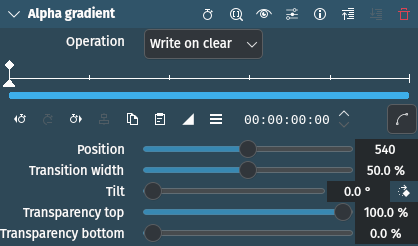
Position where the gradient starts (default is half the project vertical resolution) |
Šířka přechodu |
Procentní podíl |
Width of the gradient (default is 505) |
Náklon |
Stupně |
Rotation of the gradient in degrees (range is 0-360, default is 0) |
Transparency top |
Procentní podíl |
Sets the transparency at the top / start of the gradient (default is 100% for full transparency) |
Transparency bottom |
Procentní podíl |
Sets the transparency at the bottom / end of the gradient (default is 0% for no transparency) |
Jsou dostupné následující položky pro výběr:
Jsou dostupné následující položky pro výběr:
Write on clear |
Overlay the image (default) |
Přidat |
Add the existing pixel and the calculated gradient values |
Minimum |
Take the minimum of existing pixel and calculated gradient values |
Maximum |
Take the maximum of existing pixel and calculated gradient values |
Odečíst |
Subtract from the existing pixel the calculated gradient value |
Poznámky
In the example below a .png image has been overlayed to a video clip and the Alpha Gradient effect applied with its default values. You can see how the gradient darkens the video. Note the Operation Add to make the text opaque.
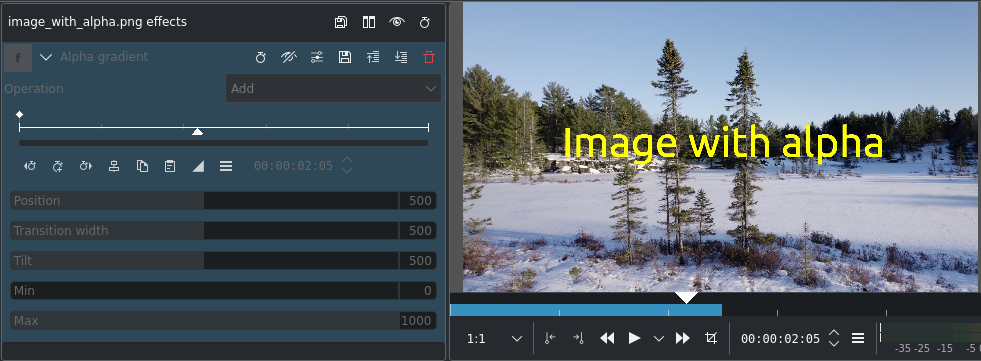
Alpha Gradient effect - before
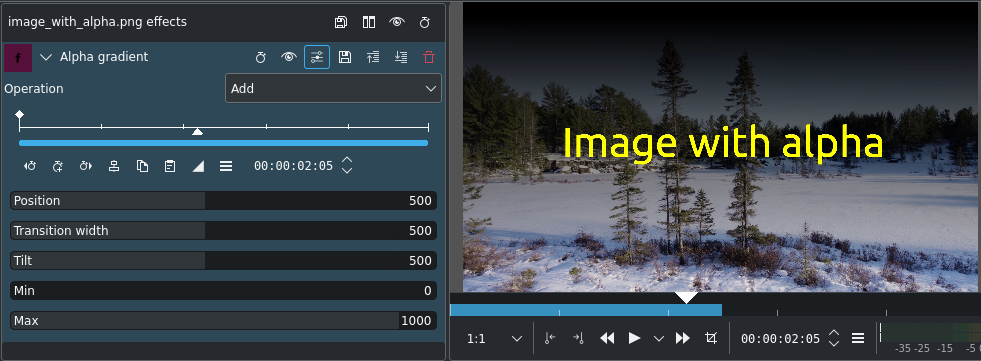
Alpha Gradient effect - after