Sledování pohybu
Popis
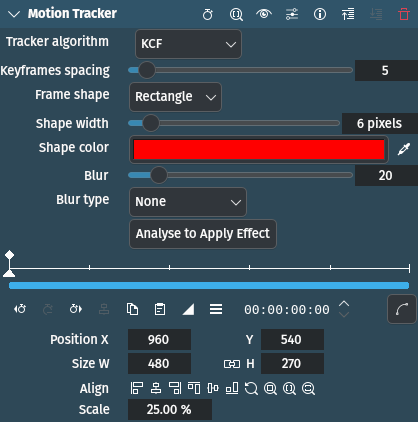
Motion tracking is the process of locating a moving object across time. Kdenlive uses OpenCV (Open Source Computer Vision Library)[1] for motion detection. The results of this effect can be used in other effects by copying the keyframe data generated by the Motion Tracker as position keyframes in the Transform effect, for example.
Parametry
Parametr |
Hodnota |
Popis |
|---|---|---|
Algoritmus trackeru |
Výběr |
Sets the algorithm used for motion tracking |
Keyframes spacing |
Celé číslo |
Determines how many keyframes can be skipped when analyzing |
Tvar rámce |
Výběr |
Set the shape of the frame |
Šířka tvaru |
Celé číslo |
Set the thickness of the frame shape |
Barva tvaru |
Kapátko |
Set the color of the frame shape. Also determines the color for Blur type Opaque Fill. |
Rozostření |
Celé číslo |
Set the amount of blur for Blur type Median Blur and Gaussian Blur |
Typ rozostření |
Výběr |
Select what to do with the framed section |
Jsou dostupné následující položky pro výběr:
Tracker algorithm
KCF |
Kernelized Correlation Filters (default) |
CSRT |
Channel and Spatial Reliability Tracking |
MOSSE |
Minimum Output Sum of Squared Error |
MIL |
Multiple Instance Learning |
MedianFlow |
|
DaSiam |
The DaSiamRPN visual tracking algorithm relies on deep-learning models to provide extremely accurate results. Please see note below for installation instructions. |
Nano |
Nano tracker is a lightweight model and gives good results and is fast. |
Tip
You may need to experiment with different tracking algorithms to produce good results for your specific use case. See a short comparison of the different tracking algorithms below.
Frame Shape
Obdélník |
Výchozí |
Elipsa |
|
Šipka |
Tip
Selecting the right shape type can make the motion tracking better.
Blur Type
Nic |
Do nothing (default) |
Median Blur |
Apply median blur to rectangle |
Gaussovo rozostření |
Apply Gaussian blur to rectangle |
Pixelizovat |
Pixelate rectangle |
Opaque fill |
Fill rectangle with shape color |
Examples for Blur Type:
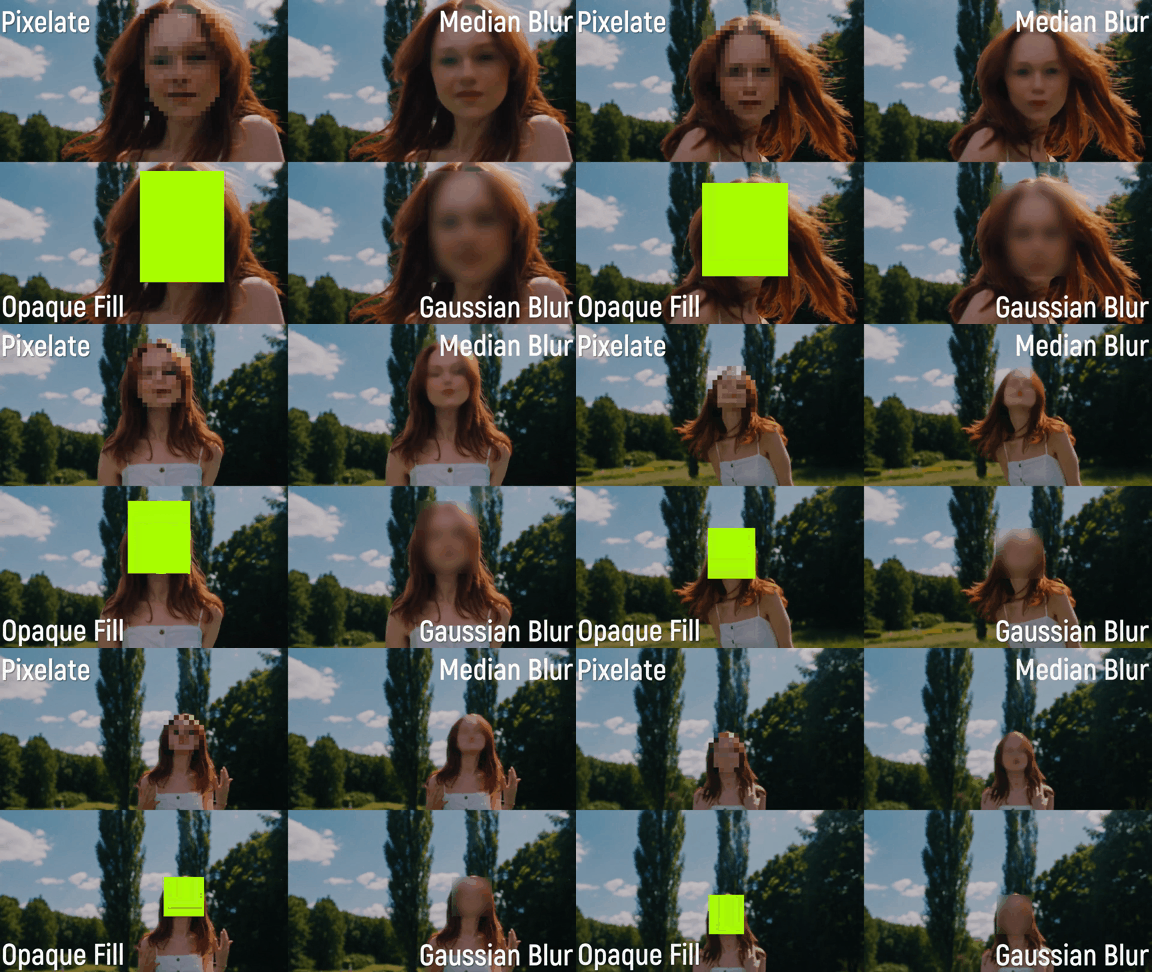
Different blur types in action
How to Track a Region of a Video
The basic workflow for tracking a region is as follows:
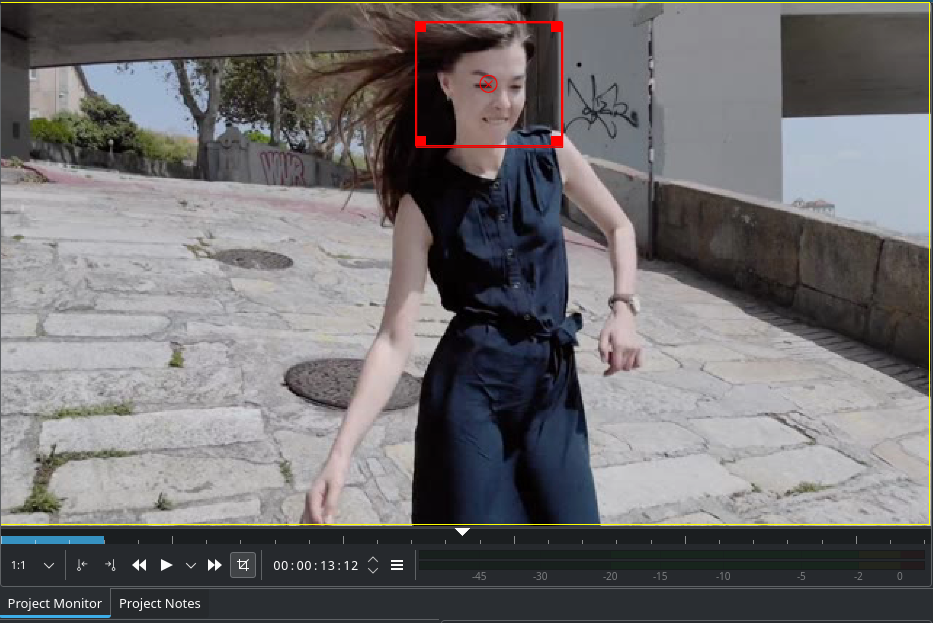
Tracking the face of the model
Použít efekt na klip
Select the desired region[2] to track on the Project Monitor
Choose a tracking algorithm
Click on the Analyze button
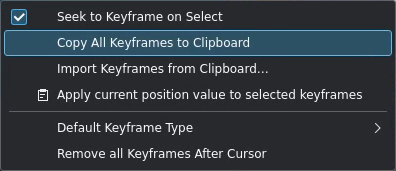
Options menu
When the analysis is done you can export the keyframes to the clipboard by clicking on
 and choose Copy all keyframes to clipboard. See also Exchanging keyframes.
Tracking algorithms
- KCF:
Kernelized Correlation Filters
Pros: Accuracy and speed are both better than MIL and it reports tracking failure better than MIL.
Cons: Does not recover from full occlusion.
- CSRT:
Channel and Spatial Reliability Tracking.
In the Discriminative Correlation Filter with Channel and Spatial Reliability (DCF-CSR), we use the spatial reliability map for adjusting the filter support to the part of the selected region from the frame for tracking. This ensures enlarging and localization of the selected region and improved tracking of the non-rectangular regions or objects. It uses only 2 standard features (HoGs and Colornames). It also operates at a comparatively lower fps (25 fps) but gives higher accuracy for object tracking.
- MOSSE:
Minimum Output Sum of Squared Error
MOSSE uses an adaptive correlation for object tracking which produces stable correlation filters when initialized using a single frame. MOSSE tracker is robust to variations in lighting, scale, pose, and non-rigid deformations. It also detects occlusion based upon the peak-to-sidelobe ratio, which enables the tracker to pause and resume where it left off when the object reappears. MOSSE tracker also operates at a higher fps (450 fps and even more).
Pros: It is as accurate as other complex trackers and much faster.
Cons: On a performance scale, it lags behind the deep learning based trackers.
- MIL:
Multiple Instance Learning
Pros: The performance is pretty good. It does a reasonable job under partial occlusion.
Cons: Tracking failure is not reported reliably. Does not recover from full occlusion.
- MedianFlow:
Pros: Excellent tracking failure reporting. Works very well when the motion is predictable and there is no occlusion.
Cons: Fails under large motion.
- DaSiam:
The DaSiamRPN visual tracking algorithm relies on deep-learning models to provide extremely accurate results.
In order to use the DaSiam algorithm you need to download the AI models
and place them in folder for models
- Nano:
Nano tracker is a lightweight model and gives good results and is fast.
In order to use the Nano algorithm you need to download the AI models (model size about 1.9 MB)
and place them in the folder for models
Folder for models
- Linux:
$HOME/.local/share/kdenlive/opencvmodels- Flatpak:
$HOME/.var/app/org.kde.kdenlive/data/kdenlive/opencvmodels- MacOS:
$HOME/Library/Application Support/kdenlive/opencvmodels- Okna:
%AppData%/kdenlive/opencvmodelsPress Win+R (Windows key and R key simultaneously) and copy %AppData%/kdenlive/. Then create the folder opencvmodels
Windows Only!
You may get an error of mlt_repository_init: failed to dlopen C:\Program Files\kdenlive\lib\mlt/libmltjack.dll or animation initialized FAILED followed by many lines of Current Frame: <f>, percentage: <p>.
In this case it is recommended to delete all kdenlive folders in C:\Program Files\, %AppData%\Roaming\, and %AppData%\Local\, and then do a new install of Kdenlive.