Rotoskopie (maska)
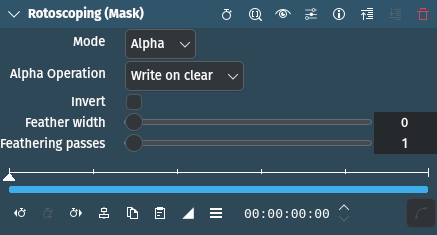
Popis
This filter takes a snapshot of the frame before it draws the Rotoscoping region/mask into the alpha channel. Use it together with the Mask Apply effect, that uses a transition to composite the current frame’s image over the snapshot. The typical use case is to add effects in the following sequence:
Parametry
Parametr |
Hodnota |
Popis |
|---|---|---|
Režim |
Výběr |
Defines the channel to apply rotoscoping to |
Operace s alfa kanálem |
Výběr |
Determines how compositing is done |
Invertovat |
Přepnout |
Inverts the rotoscoping selection |
Feathering width |
Celé číslo |
Determines the amount of feathering. Default is 0 (no feathering). |
Počet rozptýlení |
Celé číslo |
Sets the number of passes. The more passes the finer and more accurate the feathering will be. Default is 1. |
Jsou dostupné následující položky pro výběr:
Mode
Alfa |
The rotoscoped area will be the alpha channel (default) |
Luma |
|
RGB |
Alpha Operation
Write on clear |
(výchozí) |
Maximum |
|
Minimum |
|
Přidat |
|
Odečíst |
Poznámky
See the Rotoscoping effect for more details and examples.