Dynamický text
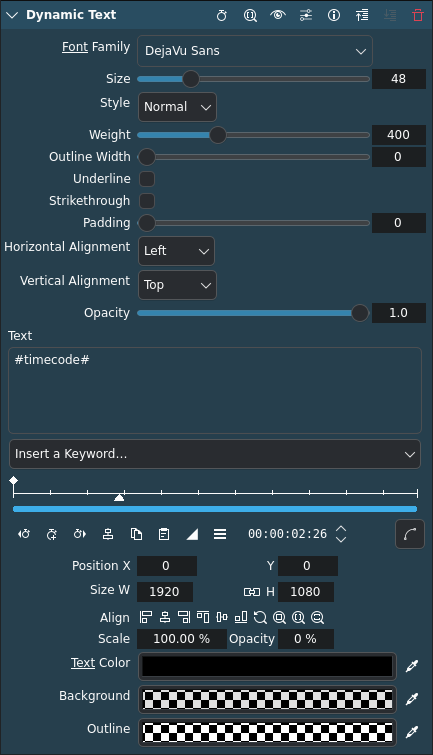
Popis
This effect allows you to overlay specific keywords to the image source, for example the timecode that counts up relative to the start of the clip or the track it is applied to, respectively. It can be controlled directly on the monitor.
Parametry
Parametr |
Hodnota |
Popis |
|---|---|---|
Font Family / Size / Style / Weight |
Selection / Integer |
Select the font and its attributes for the text. Font Weight seems to behave differently depending on the selected font family. |
Šířka obrysové čáry |
Celé číslo |
Set the width of the outline in pixels to 0, 1, 2 or 3 |
Podtržené |
Přepnout |
Enables underlined text |
Přeškrtnutí |
Přepnout |
Enables strikethrough text |
Odstup |
Celé číslo |
The number of pixels to pad the background rectangle beyond the edges of text |
Horizontal / Vertical Alignment |
Výběr |
Set the horizontal and vertical alignment within the geometry rectangle |
Text |
Řetězec |
What will be displayed as the overlay. You can add any other text between keywords. Start a new line by pressing Enter |
<Select a Keyword> |
Výběr |
Select the keywords to add to the text field |
X / Y / W / H / Size / Opacity |
X and Y coordinates, Width and Height, Size and Opacity of the overlay rectangle. You can use these parameters to fine tune the position, size and opacity of the overlay. |
|
Foreground / Background / Outline Color |
Kapátko |
Specify the colors for the text, the background rectangle defined by Padding and the outline color (if Outline Width is greater than 0). |
Jsou dostupné následující položky pro výběr:
Horizontal Alignment Vertical Alignment
Vlevo |
Výchozí |
Střed |
|
Vpravo |
The following keywords are available:
Vlastnost |
Klíčové slovo |
Popis |
|---|---|---|
Time code |
#timecode# |
SMPTE drop-frame timecode of the frame |
Číslo rámce |
#frame# |
Frame number of the frame |
Název souboru |
#filename# |
Name of the file including the file suffix (e.g. |
Base name |
#basename# |
Name of the file without the file suffix (e.g. |
Cesta |
#resource# |
Full path and filename (e.g. |
Datum vytvoření |
#createdate# |
Creation date of the file (GMT) |
File date (GMT) |
#filedate# |
Modification date of the file (GMT) |
File date (local) |
#localfiledate# |
Modification date of the file (local) |
Vzorkovací frekvence |
#meta.media.0.stream.frame_rate# |
Frame rate of the source video |
Kodek |
#meta.media.0.codec.name# |
Codec used in the source video |
Datový tok |
#meta.media.0.codec.bit_rate# |
Bit rate of the source video |
Šířka |
#meta.media.width# |
Width of the source video |
Výška |
#meta.media.height# |
Height of the source video |
Komentář |
#meta.attr.comment.markup# |
Comment embedded in the source video |
The keywords can be selected from the drop-down list or entered directly in the text field.
Timecode keywords are based on the frame rate (fps) and position of the frame. Time-based keywords can include a strftime[1] format string to customize the output as long as you put some delimiter except ‚#‘ between the keyword and the format string and the keyword comes first. For example, #localtime %I:%M:%S %p# shows only the time in 12-hour format. The ‚#‘ may be escaped with ‚'‘.
Poznámka
This effect uses the clip’s properties for the calculation of the keywords‘ values. For example, #timecode# will start counting at the beginning of the clip and not at the position of the clip in the timeline. #timecode# will reset at the start of every clip it is assigned to. In order to have #timecode# count across the whole length of your project you must assign the effect to the (main) video track or the Master.
Viz také
Renderování option in the render dialog to add time code or frame count to the entire rendered project.
Rada
In order to use a semi-transparent background color, click on the color panel, click on + and use the horizontal slider to change the transparency.
Rada
You can add effects to entire video tracks by clicking on the  icon in the track header and choosing . Video tracks that have effects added to them have the white , tracks without have a grey icon. See also Track Effect.