Audio Level Visualization Filter
Popis
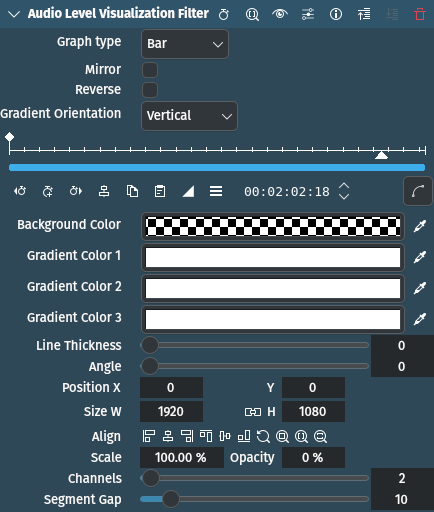
This effect/filter is an audio visualization effect that draws an audio level meter on the image. It can be controlled directly on the monitor.
Parametry
Parametr |
Hodnota |
Popis |
|---|---|---|
Typ graf |
Výběr |
Select the type of graph to display the levels |
Zrcadlit |
Přepnout |
If checked, mirrors the spectrum on the center line of the rectangle |
Obrátit směr |
Přepnout |
If checked, draws the points starting with the right channel |
Orientace přechodu |
Výběr |
Sets the direction of the color gradient |
Barva pozadí |
Kapátko |
Defines the background color to be applied to the entire frame |
Barva přechodu 1 / 2 / 3 |
Kapátko |
Defines color of the waveform gradient. Color 1 defines the top, 2 the middle and 3 the bottom of the gradient |
Tloušťka čáry |
Celé číslo |
Defines the thickness of the bar or segments in number of pixels |
Úhel |
Celé číslo |
Defines the rotation angle to be applied to the waveform |
X / Y / W / H / Size / Opacity |
Defines the X and Y coordinates, Width and Height, Size and Opacity of the rectangle in which the waveform is drawn. The icons help lining up the rectangle. |
|
Kanály |
Celé číslo |
Defines the number of channels to show |
Segment Gap |
Celé číslo |
Defines the space in pixels between segments |
Jsou dostupné následující položky pro výběr:
Graph type
Sloupec |
Výchozí |
Segment |
Gradient Orientation
Svisle |
Výchozí |
Vodorovně |
Příklad

Example of the Audio Level Visualization Filter effect
Line Thickness set to 8
Gradient Color 1 / 2 / 3 set to different colors for demonstration purposes