Transformovat
Popis
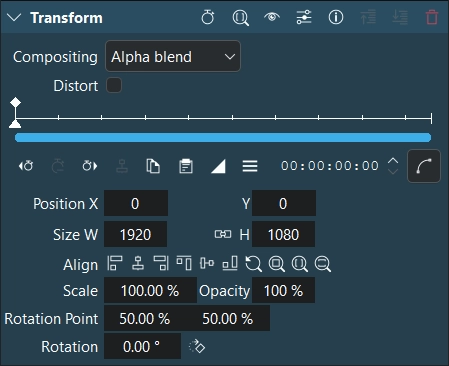
This effect/filter allows transformation and compositing of the clip at the same time. It can be controlled directly on the monitor.
Parametry
Parametr |
Hodnota |
Popis |
|---|---|---|
Kompozice |
Výběr |
Defines which composition operation will be performed. See below for available options. |
Deformovat |
Přepnout |
If checked, allows the non-uniform stretching of the clip |
X / Y / W / H / Size |
Různé |
This is where the action is for the transformation |
Rotation Point |
Různé |
Defines the point around which the clip will be rotated showed by the rotation anchor indicator. Values outside of the range of 0% to 100% move the rotation anchor outside of the clip’s frame. The default is the center of the clip (50%, 50%). 0%, 0% = top left. 0%, 100% = bottom left. 100%, 0% = top right. 100%, 100% = bottom right. |
Rotace |
Celé číslo |
Angle for rotation. Clicking on the rotate icon increments the value by 90 degrees. After reaching 360 it wraps to -360 and continues counting up with each click. |
Jsou dostupné následující položky pro výběr:
Compositing[1]
Alpha blend |
This is the default attribute which specifies no blending. The blending formula simply selects the source color. |
Plus |
|
XOR |
|
Násobit |
The source color is multiplied by the destination color and replaces the destination. The resultant color is always at least as dark as either the source or destination color. Multiplying any color with black results in black. Multiplying any color with white preserves the original color. |
Obrazovka |
Multiplies the complements of the backdrop and source color values, then complements the result. The result color is always at least as light as either of the two constituent colors. Screening any color with white produces white; screening with black leaves the original color unchanged. The effect is similar to projecting multiple photographic slides simultaneously onto a single screen. |
Přesah |
Multiplies or screens the colors, depending on the backdrop color value. Source colors overlay the backdrop while preserving its highlights and shadows. The backdrop color is not replaced but is mixed with the source color to reflect the lightness or darkness of the backdrop. |
Ztmavit |
Selects the darker of the backdrop and source colors. The backdrop is replaced with the source where the source is darker; otherwise, it is left unchanged. |
Zesvětlit |
Selects the lighter of the backdrop and source colors. The backdrop is replaced with the source where the source is lighter; otherwise, it is left unchanged. |
Color dodge |
Brightens the backdrop color to reflect the source color. Painting with black produces no changes. |
Color burn |
Darkens the backdrop color to reflect the source color. Painting with white produces no change. |
Hard light |
Multiplies or screens the colors, depending on the source color value. The effect is similar to shining a harsh spotlight on the backdrop. |
Soft light |
Darkens or lightens the colors, depending on the source color value. The effect is similar to shining a diffused spotlight on the backdrop. |
Rozdíl |
Subtracts the darker of the two constituent colors from the lighter color. Painting with white inverts the backdrop color; painting with black produces no change. |
Exclusion |
Produces an effect similar to that of the Difference mode but lower in contrast. Painting with white inverts the backdrop color; painting with black produces no change. |
Bitové OR |
|
Bitové AND |
|
Bitové XOR |
|
Bitové NOR |
|
Bitové NAND |
|
Bitové NE XOR |
|
Destination in |
|
Destination out |
- Bitové:
The top track’s alpha controls interpolation between the lower track and the combined tracks
- Cíl:
Can be used as a mask where overlapping non transparent pixels are drawn or not