萬花筒
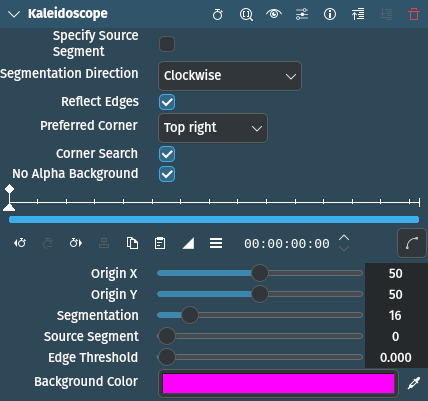
描述
Applies a kaleidoscope effect.
參數
參數 |
數值 |
描述 |
|---|---|---|
Specify Source Segment |
開關 |
If on, the source angle is read from Source segment, otherwise auto-calculated |
分段方向 |
Selection |
Options are None, Counter clockwise, and Clockwise (default) |
Reflect Edges |
開關 |
If on, then reflections that end up outside the source reflect back into it, otherwise the specified background color is used |
Preferred Corner |
Selection |
Options are Top right (default), Top left, Bottom left, and bottom right |
Corner Search |
開關 |
If on, search clockwise for furthest corner, otherwise counter clockwise |
無透明背景 |
開關 |
If reflection lies outside of source image and not reflecting back in, the selected color is used. Default is On. |
原點 X |
浮點數 |
X-coordinate of the origin of the kaleidoscope. Default 50 (center). |
原點 Y |
浮點數 |
Y-coordinate of the origin of the kaleidoscope. Default 50 (center). |
分段 |
浮點數 |
Kaleidoscope segmentation / 128. Segmentations of 1, 2 or multiples of 4 work best. Default 16 (16/128 = 0.125) |
Source Segment |
浮點數 |
Centre of source segment if Specify source segment is on. 0 is in +x and rotates counter clockwise |
邊緣閥值 |
浮點數 |
Edge threshold / 4, reflections outside the image but within this distance clamp to the edge. Default is 0 |
Background Color |
Picker |
Color to use if reflection lies outside of source image and not reflecting back in (Reflect edges is off). Default is pink. |