Defish
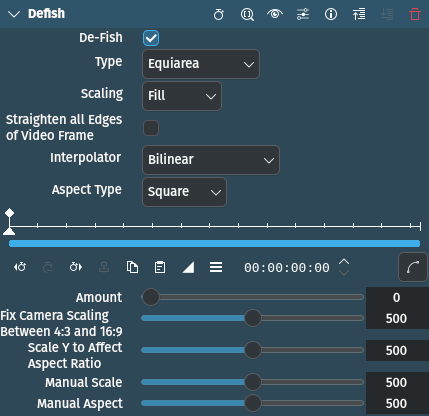
描述
This effect can transform footage shot with a fisheye lens to look like it was shot with a rectilinear lens, and vice versa. It can also be used to straighten the video that was shot with one of these wide angle converters, which are only slightly curvy, or with a semi-fisheye camera, like the GoPro Hero.
參數
參數 |
數值 |
描述 |
|---|---|---|
De-Fish |
開關 |
If checked, the transform direction is from fisheye to rectilinear, when not checked, it is rectilinear to fisheye. |
類型 |
選取 |
Selects the fisheye angular mapping function used |
縮放 |
選取 |
Select the scaling method |
Straighten all Edges of Video Frame |
開關 |
|
Interpolation |
選取 |
Select which interpolation method to use. Options: see below. |
Aspect Type |
選取 |
Select the pixel aspect type[1]. |
數量 |
整數 |
Controls the amount of (de)distortion applied to the video. More details below. |
Fix Camera Scaling Between 4:3 and 16:9 |
整數 |
|
Scale Y to Affect Aspect Ratio |
整數 |
|
手動處理程度 |
整數 |
Scales the video. Range is 0 to 1000 (divided by 500 to get scaling factor). |
手動處理趨勢 |
整數 |
Controls directly the pixel aspect ratio. Range is 0 to 1000 mapped to from 0.5 to 2. Only used if Aspect Type is set to manual. |
可以使用以下選項:
Type
Equidistant |
|
Orthographic |
Straighten all edges of video frame |
Equiarea |
預設 |
立體投影(Stereographic) |
Scaling
適中 |
no cropping but there will be blank area at the borders |
手動 |
see Manual Scale |
Interpolator
Nearest neighbor |
|
雙線性 |
預設 |
Bicubic smooth |
|
Bicubic sharp |
|
Spline 4x4 |
|
Spline 6x6 |
|
Lanczos 16x16 |
Aspect Type
方形 |
預設 |
PAL DV |
1.067 ratio |
NTSC DV |
0.889 |
HDV |
1.333 |
手動 |
see Manual Aspect |
Parameters explained
- Interpolation:
The seven different interpolation methods allow making a quality/speed trade-off. The interpolators are ordered from fast, low quality to (very) slow, high quality. The spline interpolating polynomials are from Helmut Dersch. For real-time use, Nearest neighbor is the fastest because, in fact, it is equal to no interpolation. In most cases Bilinear should be good enough, and on a decent machine should still run in real time. Beyond Bicubic, the quality gain is marginal for a single resampling. Lanczos takes an eternity!
- 數量:
Controls the amount of (de)distortion applied to the video. It controls the ratio of fisheye focal length to image half diagonal, but in an nonlinear inverse way, to make the control more 「comfortable」. It can be adjusted beyond 「reasonable」 values (which differ between the mapping function types), to produce some looney effects. When exploring this range and the image disappears, check the scaling as it could be that the image became too big or too small to see. For some unreasonable values the image might indeed disappear, when there are math overflows or imaginary results (Type Equidistant and Orthographic are more prone to image vanishing). When working in the 「special effect」 range, it is always worth to try manual scaling. If the video contains zooming through a curvy wide angle adaptor, the needed amount will vary. In this case use keyframing.
備註
Tweaking the parameters for best defish
Take a shot of something like a brick wall or bathroom tiles, that has a lot of horizontal and vertical straight lines. Be careful to keep the optical axis as perpendicular as possible to the wall (i.e. keep a maximally symmetrical image in the viewfinder). Use this image to tweak the parameters, primarily amount, type and aspect.
Some examples of effect abuse
These were tried with PAL DV. These examples work best when there is some interesting action near the center of the image.
For a kind of roundish kaleidoscope, try this:
數量
775
Defish
關閉
類型
equidistant
縮放
手動
手動處理程度
300…400
Another crazy distortion:
數量
921
Defish
關閉
類型
stereographic
縮放
手動
手動處理程度
191
For an effect reminiscent of some scenes from the 「2001 Space Odyssey」 movie try this:
數量
900
Defish
開啟
類型
立體投影(Stereographic)
縮放
填充