VR360 Hemispherical to Equirectangular
描述
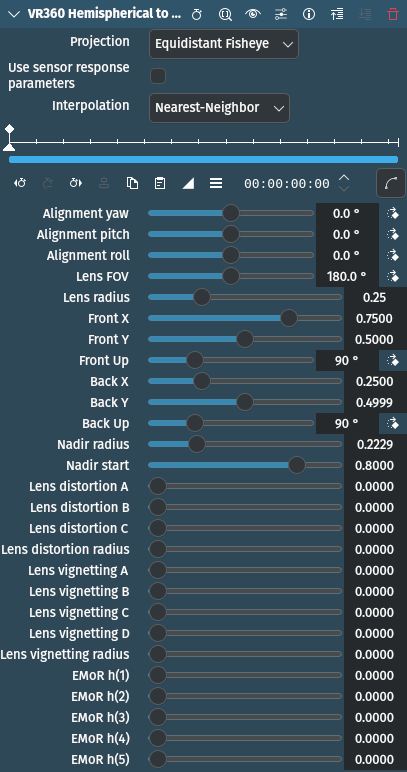
This effect/filter converts a video frame with two hemispherical images to a single equirectangular frame.
The plugin assumes that both hemispheres are in the frame. If you have a camera like the Garmin Virb360 that produces two videos, one from each camera, you should start by converting them to a single movie by placing them side by side using, for example, ffmpeg (you can also add parameters to produce lossless, intra-only output here for easier editing):
ffmpeg \
 -i left.mp4 \
 -i right.mp4 \
 -filter_complex hstack \
 output.mp4
參數
參數 |
數值 |
描述 |
|---|---|---|
投影 |
選取 |
The fisheye projection type. Currently only equidistant fisheyes, like the Ricoh Theta and Garmin Virb360 are supported. |
Use sensor response parameters |
Switch |
Switch on to use sensor response parameters (see EMoR h(x) parameters below) |
插值 |
選取 |
Determines the sampling method |
Alignment Yaw / Pitch / Roll |
整數 |
Adjust the rotation along the Z- (yaw), X- (pitch) and Y-axis (roll) to compensate for any alignment differences |
鏡頭視野範圍 |
整數 |
Field of View of a single hemisphere in degrees |
Lens Radius |
浮點數 |
Radius of the image circle as a fraction of the frame width (for example 0.25 = 25% of 1920) |
Front X / Y |
浮點數 |
Defines the center of the image of the front-facing camera. X is expressed as a fraction of the image width, Y as a fraction of the image height. |
Front UP |
整數 |
Defines the 「up」 direction in the image in degrees counting clockwise from a directions towards the top edge |
Back X / Y |
浮點數 |
Defines the center of the image of the back-facing camera. X is expressed as a fraction of the image width, Y as a fraction of the image height. |
Back UP |
整數 |
Defines the 「up」 direction in the image in degrees counting clockwise from a directions towards the top edge |
Nadir Radius / Start |
浮點數 |
Adjust the nadir of the camera if you have parts of the camera or equipment in the image |
Lens distortion A / B / C |
浮點數 |
Lens distortion correction parameters. The first three parameters are the same as in Hugin. |
Lens distortion radius |
浮點數 |
Lens distortion correction parameters. If you use Hugin parameters, the Radius should be set to the value of (0.5 * min(image width, image height) / image width). For a 2:1 aspect dual hemispherical image, that would be 0.25. |
Lens vignetting A / B / C / D |
浮點數 |
Lens vignetting correction parameters. The first four parameters are the same as in Hugin, corresponding to the Va , Vb , Vc , and Vd image parameters. |
Lens vignetting radius |
浮點數 |
If you use Hugin parameters, the radius should be set to the value of (0.5 * image diagonal / image width). For a 2:1 aspect dual hemispherical image, that would be 0.5590. Use the A parameter to scale the effect and avoid overexposing highlights. |
EMoR h(1 / 2 / 3 / 4 / 5) |
浮點數 |
Sensor response parameters. The EMoR h(x) parameters are the same as Hugin』s Ra - Re in the lens parameters. If you use Hugin-derived values for vignetting correction, you should also use these parameters, as Hugin』s vignetting correction assumes that the sensor response has been corrected. |
可以使用以下選項:
Projection
Equidistant Fisheye |
預設 |
Interpolation
Nearest-Neighbor |
預設 |
雙線性 |