Projektinställningar
Projektinställningar definierar först och främst egenskaperna för den slutliga videon (trots en omskalnings- eller utdataformatändring under återgivningsprocessen). Det omfattar dimensioner (t.ex. 1920 x 1080), proportion (t.ex. 16:9, 9:16 eller 4:3), bildhastighet (t.ex. 30 bilder/s), färgrymd och inflätad eller progressiv återgivning.
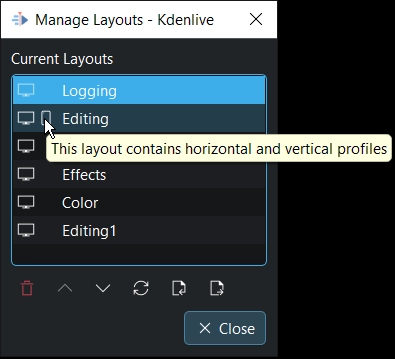
Beroende på projektprofilen som är vald, byter redigeringslayouten automatiskt mellan horisontellt och vertikalt och säkra områden anpassas samtidigt.
Förutom det kan du definiera var Kdenlive lagrar alla projekttillgångar, hur många video- och ljudspår det finns initialt (man kan lägga till eller ta bort spår senare efter behov), om Kdenlive ska skapa ersättningsfiler automatiskt och under vilka omständigheter, och man kan ange metadata som upphovsmannens namn och upphovsrättsinformation för inbäddning i multimediabehållaren under export/återgivning.
Här definierar man också kategorierna och färgerna för de tidslinjemarkörer och markörer som kan användas i tidslinjen för att strukturera projektet.
När projektet väl är igång hittar man statistik om projektet här, som antal och storlek på klippen, använda kontra oanvända, och om datacachen. Kdenlive ger full kontroll över användningen och utnyttjande av tillgångar.
Dialogrutan för projektinställningar öppnas varje gång ett nytt projekt skapas (), eller via menyn .
Projektinställningarnas dialogfönster har sex flikar: