計時器
描述
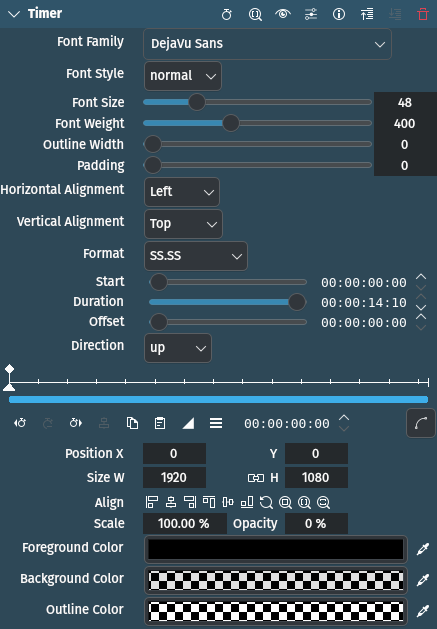
This effect/filter overlays a timer onto the video. The timer can count up or down.
參數
參數 |
數值 |
描述 |
|---|---|---|
Font Family / Style / Size / Weight |
Selection / Integer |
Select the font and its attributes for the text. Font Weight seems to behave differently depending on the selected font family. |
輪廓寬度 |
整數 |
Set the width of the outline in pixels to 0, 1, 2 or 3 |
填補範圍 |
整數 |
The number of pixels to pad the background rectangle beyond the edges of text |
水平 / 垂直對齊 |
選取 |
Set the horizontal and vertical alignment within the geometry rectangle |
格式 |
選取 |
The time format of the timer text |
開始 |
滑動器 |
The time that the timer will start counting up or down. The text will be frozen at 00:00:00.000 from the start of the filter until the start time has elapsed. |
期間 |
滑動器 |
The maximum elapsed duration of the timer after the start time has elapsed. The text will be frozen at the duration time after the duration has elapsed. |
位移 |
滑動器 |
An offset to be added to the timer value. When the direction is 「down」, the timer will count down to 「offset」 instead of 00:00:00.000. When the direction is up, the timer will count up starting from 「offset」. |
方向 |
選取 |
Whether the counter should count up from 00:00:00.000 or down from the duration time. |
X / Y / W / H / Size / Opacity |
Integer / Percent |
X and Y coordinates, Width and Height, Size and Opacity of the overlay rectangle. You can use these parameters to fine tune the position, size and opacity of the overlay. |
Foreground / Background / Outline Color |
Picker |
Specify the colors for the text (foreground), the background rectangle defined by Padding and the outline color (if Outline Width is greater than 0). |
可以使用以下選項:
Horizontal Alignment Vertical Alignment
水平 |
垂直 |
|---|---|
左 |
頂端 |
置中 |
置中 |
右 |
底端 |
Direction
上 |
Timer counts up |
下 |
Timer counts down |
Format
HH:MM:SS |
hours:minutes:seconds |
HH:MM:SS.S |
hours:minutes:seconds.1/10th |
MM:SS |
minutes:seconds |
MM:SS.SS |
minutes:seconds.1/100th |
MM:SS.SSS |
minutes:seconds.1/1000th (milliseconds) |
SS |
秒 |
SS.S |
seconds.1/10th |
SS.SS |
seconds.1/100th |
SS.SSS |
seconds.1/1000th (milliseconds) |
提示
In order to use a semi-transparent background color, click on the color panel, click on + and use the horizontal slider to change the transparency.