示波器(進階)
描述
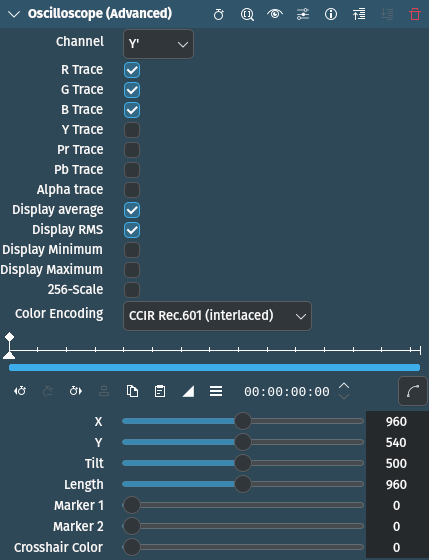
This effect/filter draws a 2D oscilloscope over the clip. It does the same as Oscilloscope (simple) but offers more parameters and features, such as drawing a line across the frame that is used for the computations.
參數
參數 |
數值 |
描述 |
|---|---|---|
頻道 |
選取 |
Channel to numerically display at the bottom of the scope |
R / G / B trace |
開關 |
Show R / G / B trace on scope |
Y / Pr / Pb trace |
開關 |
Show Y』 / Pr / Pb trace on scope |
Alpha trace |
開關 |
Show Alpha trace on scope |
顯示平均值 |
開關 |
If switched on, averages are displayed |
顯示 RMS |
開關 |
If switched on, the RMS[1] value is displayed |
Display minimum / maximum |
開關 |
If switched on, minimum and maximum values are displayed |
256 scale |
開關 |
If switched on, the oscilloscope uses the range 0..255 instead of 0.0..1.0 for value display |
顏色 |
選取 |
Set color space to use |
X / Y / Tilt / Length |
整數 |
X / Y position, Tilt and Length of the profile marker (the line in the middle of the screen indicating where the scope values are taken from) |
Marker 1 / 2 |
整數 |
Position of marker 1 / 2 (starting on the left side) |
Crosshair color |
整數 |
Color of the profile marker |
可以使用以下選項:
Channel
R |
紅色 |
G |
綠色 |
B |
藍色 |
Y』 |
luma (default) |
Pr |
Difference between red and luma |
Pb |
Difference between blue and luma |
Alpha |
Alpha 通道 |
Color
CCIR rec. 601 |
預設 |
CCIR rec. 709 |