Light Graffiti
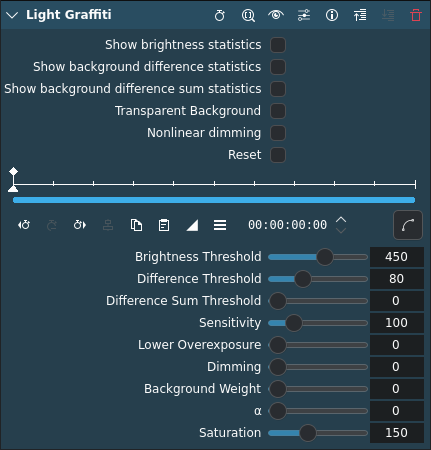
Descripción
This effect/filter creates light graffitis from a video by keeping the brightest spots.
Parámetros
Statistics (above the keyframe ruler)
The stats switches allow easy and accurate adjustment of the threshold parameters.
Parámetro |
Valor |
Descripción |
|---|---|---|
Show brightness statistics |
Switch |
If on, displays the brightness and threshold, for adjusting the brightness threshold parameter.
Example: To adjust the brightness threshold, check this box and adjust the threshold until the whole light source is highlighted. Repeat the same with the other parameters. Only parts that are highlighted in all thresholds will count as light source.
|
Show background difference statistics |
Switch |
If on, displays the background difference and threshold |
Show background difference sum statistics |
Switch |
If on, displays the sum of the background difference and threshold |
Switches (above the keyframe ruler)
Parámetro |
Valor |
Descripción |
|---|---|---|
Transparent background |
Switch |
Makes the background transparent, allowing to apply a composite effect and paint the light mask over a completely different video. |
Nonlinear dimming |
Switch |
If on, uses nonlinear dimming (may look more natural) |
Reset |
Switch |
Use this to reset the clip if you need to adjust parameters. The effect will not reset if the clip is played again, so you need to do this manually. |
Nota
If Reset is not switched off, the effect will not produce any visible results.
Parámetros
Parámetro |
Valor |
Descripción |
|---|---|---|
Umbral de brillo |
Integer |
How bright ( |
Difference threshold |
Integer |
How much does the strongest color channel of a pixel have to change, compared to the background image ( |
Difference sum threshold |
Integer |
How much does the sum of all color channels relative to the background image ( |
Sensitivity |
Integer |
For slowly moving light source try to use a lower sensitivity to obtain a better exposure. |
Lower overexposure |
Integer |
The light mask does not get white immediately when the light source is moving slowly or staying steady. |
Dimming |
Integer |
Dims the light mask. Lights will leave a fainting trail if it is set to a value > 0. |
Background weight |
Integer |
Strength of the (calculated) background image. Setting it to 100 paints the light mask directly over the background, without the painting person in the image if the video starts with a «clean» background image. (See the α parameter.) |
α |
Integer |
Determines how the effect tries to adapt to background changes. The Light Graffiti effect remembers the first frame of the clip it is applied to, so the clip should always start with the painter outside of the video. If the background constantly changes, e.g. on a street, try to set α > 0 to calculate an average background image. |
Saturación |
Integer |
Increases the saturation of lights. |