Alpha 操作
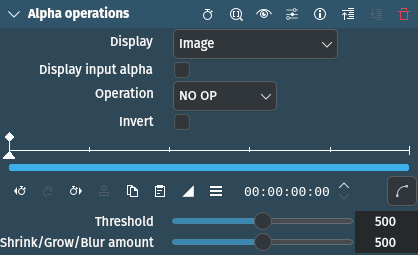
描述
This effect can shrink, grow, threshold and invert the alpha channel. It is mainly intended to improve keying edges. It can also display the alpha channel in various ways to enable quick assessment of the effect. It is cascadable and thus allows a soft shrink first followed by threshold which gives a slightly different result than a hard shrink[1].
參數
參數 |
數值 |
描述 |
|---|---|---|
顯示 |
選取 |
What to display (see below) |
顯示輸入透明度 |
開關 |
Use input alpha for the display function above (check what alpha we are getting on the input) |
操作 |
選取 |
Select the operation to be done on the alpha channel (see below) |
反轉 |
開關 |
Inverts the input alpha channel, transparent will become opaque and vice versa. |
黑白索引色 |
整數 |
This is only used for the Threshold operation |
Shrink/Grow/Blur |
整數 |
Depending on the chosen operation: How far the shrinking/growing will extend, or the amount of blur |
可以使用以下選項:
Display
This is intended for monitoring during adjustment mostly. After adjusting the parameters, it should be left on Image, which lets the unchanged input image through - this effect is intended to change only the alpha channel.
圖片 |
Image after the operation (default) |
Alpha as gray |
Displays the alpha channel as gray |
Gray + red |
Displays the alpha channel as gray, everything else as red |
Selection on black |
Displays the non-alpha channels on a black background |
Selection on gray |
Displays the non-alpha channels on a gray background |
Selection on white |
Displays the non-alpha channels on a white background |
Selection on checkers |
Displays the non-alpha channels on a checkered background |
Operation
NO OP |
No operation is performed |
Shave |
Tries to remove the 「hairy」 stuff, and also shrinks the selection a bit |
Shrink hard |
Shrinks the area of the alpha channel |
Shrink soft |
Shrinks the area of the alpha channel |
Grow hard |
Grows the area of the alpha channel |
Grow soft |
Grows the area of the alpha channel |
黑白索引色 |
Increases or decreases the area of the alpha channel by the threshold |
模糊 |
Blurs the area between the alpha and the other channels |
The … hard operations introduce no new values to the alpha channel, so if you have a hard key (only 0 and 255) it will stay that way.
The … soft operations will introduce interpolated values, making the edge softer.
備註
The shave, shrink and grow operations are quite slow, because they do many conditional operations on each pixel.
備註
This tutorial shows usage of Alpha Operations with Shrink Hard as well as the following effects: 色度鍵:基本, HQ 3D Denoiser, and 溢出擦除.
備註
This video is somewhat outdated. In newer versions of Kdenlive the 溢出擦除 effect is installed by default, and it is no longer required to use a composite transition. Nevertheless, the basic steps of chroma keying and key spill mop up are explained and are still valid.