轉描(遮罩)
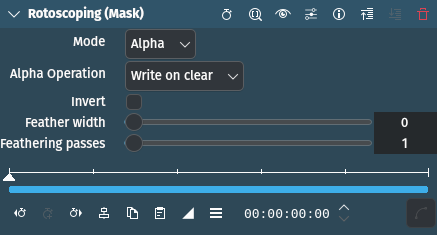
描述
This filter takes a snapshot of the frame before it draws the Rotoscoping region/mask into the alpha channel. Use it together with the Mask Apply effect, that uses a transition to composite the current frame’s image over the snapshot. The typical use case is to add effects in the following sequence:
參數
參數 |
數值 |
描述 |
|---|---|---|
模式 |
選取 |
定義要套用轉描到的頻道 |
Alpha 操作 |
選取 |
決定合成如何進行 |
反轉 |
開關 |
反轉轉描的選取區域 |
羽化寬度 |
整數 |
Determines the amount of feathering. Default is 0 (no feathering). |
羽化步驟 |
整數 |
Sets the number of passes. The more passes the finer and more accurate the feathering will be. Default is 1. |
可以使用以下選項:
模式
Alpha |
The rotoscoped area will be the alpha channel (default) |
Luma |
|
RGB |
Alpha 操作
清除時寫入 |
(預設) |
最大 |
|
最小 |
|
Add |
|
Subtract |
備註
See the Rotoscoping effect for more details and examples.