音訊音量視覺化過濾器
描述
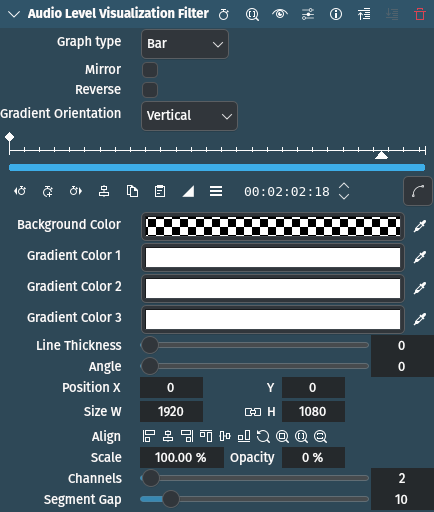
This effect/filter is an audio visualization effect that draws an audio level meter on the image. It can be controlled directly on the monitor.
參數
參數 |
數值 |
描述 |
|---|---|---|
圖表類型 |
選取 |
Select the type of graph to display the levels |
鏡像 |
開關 |
If checked, mirrors the spectrum on the center line of the rectangle |
反轉 |
開關 |
If checked, draws the points starting with the right channel |
漸層方向 |
選取 |
Sets the direction of the color gradient |
背景顏色 |
Picker |
Defines the background color to be applied to the entire frame |
Gradient Color 1 / 2 / 3 |
Picker |
Defines color of the waveform gradient. Color 1 defines the top, 2 the middle and 3 the bottom of the gradient |
線條粗細 |
整數 |
Defines the thickness of the bar or segments in number of pixels |
角度 |
整數 |
Defines the rotation angle to be applied to the waveform |
X / Y / W / H / Size / Opacity |
Defines the X and Y coordinates, Width and Height, Size and Opacity of the rectangle in which the waveform is drawn. The icons help lining up the rectangle. |
|
頻道 |
整數 |
Defines the number of channels to show |
片段距離 |
整數 |
Defines the space in pixels between segments |
可以使用以下選項:
圖表類型
長條圖 |
預設 |
線段 |
Gradient Orientation
垂直 |
預設 |
水平 |
範例

Example of the Audio Level Visualization Filter effect
Line Thickness set to 8
Gradient Color 1 / 2 / 3 set to different colors for demonstration purposes