音波顯示器
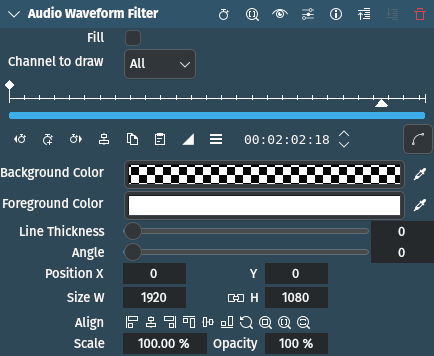
描述
This effect/filter is an audio visualization effect that draws an audio waveform on the image. It can be controlled directly on the monitor.
參數
參數 |
數值 |
描述 |
|---|---|---|
填充 |
開關 |
If checked the area below the line will be filled using the color specified with Foreground Color. |
要繪製的聲道 |
選取 |
Defines which channels in the audio track to draw |
背景顏色 |
Picker |
Defines the background color to be applied to the entire frame |
前景顏色 |
Picker |
Defines the color of the waveform |
線條粗細 |
整數 |
Defines the thickness of the line in number of pixels |
角度 |
整數 |
Defines the rotation angle to be applied to the waveform |
X / Y / W / H / Size / Opacity |
Defines the X and Y coordinates, Width and Height, Size and Opacity of the rectangle in which the waveform is drawn. The icons help lining up the rectangle. Opacity cannot be changed. |
可以使用以下選項:
Channel to draw
全部 |
預設 |
合併 |
|
1 - 10 |
小訣竅
Opacity is fixed at 100%. You control the opacity/transparency of the effect by adjusting the alpha component of the Foreground color.
範例

Example of the Audio Waveform Filter effect with default settings