Efekt Vinětace
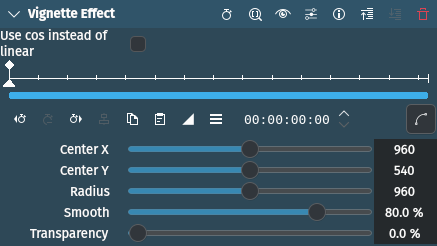
Popis
This effect/filter creates an adjustable vignette. It is similar to the Vinětace effect but lacks the adjustment of the aspect ratio.
Parametry
Parametr |
Hodnota |
Popis |
|---|---|---|
Use cos instead of linear |
Přepnout |
If selected makes the fall-off area appear denser by applying a cosine curve instead of a linear function |
Hladké |
Procentní podíl |
Set the size of the fall-off area. Higher values make the center darker and the edges lighter. If smooth is set to zero, the vignette is like a black matte with a distinct edge. |
Poloměr |
Celé číslo |
Set the radius of the vignette |
Center X / Y |
Celé číslo |
Define the X and Y coordinates for the center point of the vignette (X = 0, Y = 0 defines the top-left corner of the screen) |
Průhlednost |
Celé číslo |
Set the transparency of the black parts of the vignette |