Vectorscope (advanced)
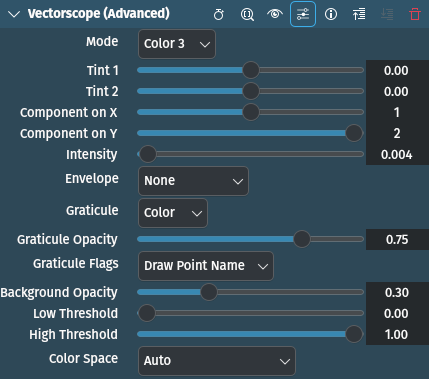
Description
This effect/filter draws and overlays a vectorscope of the video data. Compared to the Vectorscope effect it offers parameters to control the display mode and a few other things.
This is different from the Vectorscope from the View Menu because the Effect version writes the vectorscope into the output video, whereas the View Menu version displays the vectorscope in a separate widget while you still can preview your project.
Parameters
Parameter |
Value |
Description |
|---|---|---|
Mode |
Selection |
Set the vectorscope mode. See below for available options. |
Tint 1 / Tint 2 |
Float |
Set color tint for gray/tint vectorscope mode. By default both options are zero. This means no tint, and output will remain gray. |
X / Y |
Integer |
Set which color component will be represented on X / Y axis |
Intensity |
Float |
Set intensity used by modes gray, color, color3 and color5 for increasing brightness of color component which represents frequency of (X, Y) location in graph |
Envelope |
Selection |
Set whether the scope draws an edge or not and how the edge behaves. See below for available options. |
Graticule |
Selection |
Set what kind of graticule to draw. See below for available options. |
Graticule Opacity |
Float |
Set graticule opacity |
Graticule Flags |
Selection |
Set graticule flags. See below for available options. |
Background Opacity[1] |
Float |
Set background opacity |
Low Threshold |
Float |
Set low threshold for color component not represented on X or Y axis. Values lower than this value will be ignored. Default is 0. Note this value is multiplied with the actual max possible value one pixel component can have. So for 8-bit input and low threshold value of 0.1 the actual threshold is 0.1 * 255 = 25. |
High Threshold |
Float |
Set high threshold for color component not represented on X or Y axis. Values higher than this value will be ignored. Default is 1. Note this value is multiplied with the actual max possible value one pixel component can have. So for 8-bit input and high threshold value of 0.9 the actual threshold is 0.9 * 255 = 230. |
Color Space |
Selection |
Set what kind of color space to use when drawing graticule |
The following selection items are available:
Mode
Gray |
|
Tint |
|
Color |
|
Color 2 |
|
Color 3 |
default |
Color 4 |
|
Color 5 |
Envelope
None |
default |
Instant |
Even darkest single pixel will be clearly highlighted |
Peak |
To hold maximum and minimum values presented in graph over time (this way you can still spot out-of-range values without constantly looking at the vectorscope) |
Peak+Instant |
For peak and instant envelope combined together |
Graticule
None |
|
Color |
default |
Green |
Graticule Flags
White |
Draw graticule for white point |
Black |
Draw graticule for black point |
Name |
Draw color points short names (default) |
Color Space
Auto |
default |
Rec.601 (interleaved) |
|
Rec.709 (progressive) |