Curves - 曲线
Description
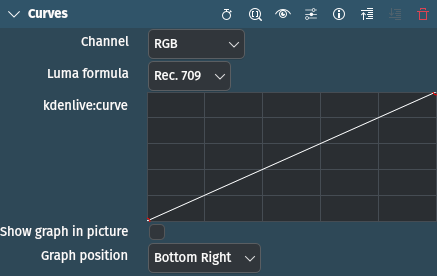
This effect/filter adjusts shadows, midtones and highlights of an image using curves. It is similar to the Color Levels or Levels - 色阶 effects but with the option to create additional points along the curve allowing for pinpoint accuracy when adjusting brightness values.
Parameters
Parameter |
Value |
Description |
|---|---|---|
Channel |
Selection |
Set the channel to which the curve applies. |
Luma formula |
Selection |
Set the color space in which the application takes place |
In |
Float |
Set the Input value |
Out |
Float |
Set the Output value |
Show graph in picture |
Switch |
Check this box to overlay the graph onto the image in the Project Monitor. Note that this influences the Scope - RGB Parade and Scope - Histogram widgets. |
Graph position |
Selection |
Select the position for the graph |
The following selection items are available:
Channel
RGB |
Default |
Red |
|
Green |
|
Blue |
|
Alpha |
|
Luma |
|
Saturation |
Luma formula
Rec. 709 |
Default |
Rec. 601 |
Graph position
Top left |
|
Top right |
|
Bottom left |
|
Bottom right |
Default |
提示
It is recommended to use this effect while in Color layout as this comes with RGB Parade and Scope - Histogram already switched on. If you want to use the effect while in Editing or Effects layout, turn on the Histogram widget with .
参见
The Bezier Curves effect does the same but has the ability to adjust the steepness/flatness of the curves.