Operace s alfa kanálem
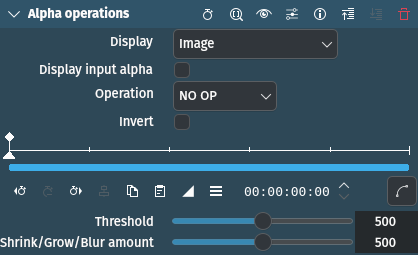
Popis
This effect can shrink, grow, threshold and invert the alpha channel. It is mainly intended to improve keying edges. It can also display the alpha channel in various ways to enable quick assessment of the effect. It is cascadable and thus allows a soft shrink first followed by threshold which gives a slightly different result than a hard shrink[1].
Parametry
Parametr |
Hodnota |
Popis |
|---|---|---|
Zobrazení |
Výběr |
What to display (see below) |
Zobrazit vstupní alfa kanál |
Přepnout |
Use input alpha for the display function above (check what alpha we are getting on the input) |
Operace |
Výběr |
Select the operation to be done on the alpha channel (see below) |
Invertovat |
Přepnout |
Inverts the input alpha channel, transparent will become opaque and vice versa. |
Práh |
Celé číslo |
This is only used for the Threshold operation |
Shrink/Grow/Blur |
Celé číslo |
Depending on the chosen operation: How far the shrinking/growing will extend, or the amount of blur |
Jsou dostupné následující položky pro výběr:
Display
This is intended for monitoring during adjustment mostly. After adjusting the parameters, it should be left on Image, which lets the unchanged input image through - this effect is intended to change only the alpha channel.
Obrázek |
Image after the operation (default) |
Alfa jako šedá |
Displays the alpha channel as gray |
Šedá + červená |
Displays the alpha channel as gray, everything else as red |
Selection on black |
Displays the non-alpha channels on a black background |
Selection on gray |
Displays the non-alpha channels on a gray background |
Selection on white |
Displays the non-alpha channels on a white background |
Selection on checkers |
Displays the non-alpha channels on a checkered background |
Jsou dostupné následující položky pro výběr:
NO OP |
No operation is performed |
Shave |
Tries to remove the „hairy“ stuff, and also shrinks the selection a bit |
Shrink hard |
Shrinks the area of the alpha channel |
Shrink soft |
Shrinks the area of the alpha channel |
Grow hard |
Grows the area of the alpha channel |
Grow soft |
Grows the area of the alpha channel |
Práh |
Increases or decreases the area of the alpha channel by the threshold |
Rozostření |
Blurs the area between the alpha and the other channels |
The … hard operations introduce no new values to the alpha channel, so if you have a hard key (only 0 and 255) it will stay that way.
The … soft operations will introduce interpolated values, making the edge softer.
Poznámka
The shave, shrink and grow operations are quite slow, because they do many conditional operations on each pixel.
Poznámky
This tutorial shows usage of Alpha Operations with Shrink Hard as well as the following effects: Klíčování: Základní, HQ 3D Denoiser, and Key Spill Mop Up.
Poznámka
This video is somewhat outdated. In newer versions of Kdenlive the Key Spill Mop Up effect is installed by default, and it is no longer required to use a composite transition. Nevertheless, the basic steps of chroma keying and key spill mop up are explained and are still valid.