Meni Pomoč
Meni Pomoč omogoča dostop do različnih informacij.
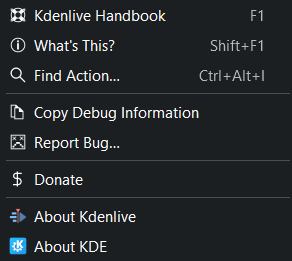
Meni Pomoč programa Kdenlive
Priročnik Kdenlive ali pritisnite F1, da odprete spletni priročnik Kdenlive, ki ga pravkar berete.
Kaj je to? ali pritisnite dvigalka+F1. Ta funkcija do zaenkrat še ni implementirana.
Poišči dejanje
Ta funkcija vam omogoča iskanje poljubnega ukaza ali dejanja, ki je na voljo. Preprosto vnesite iskalni izraz in nato izberite ukaz ali dejanje, ki ga želite izvršiti. Kdenlive uporablja mehko iskanje ali iskanje vnaprej, tako da vsak znak, ki ga vnesete, sproti spreminja rezultat iskanja.
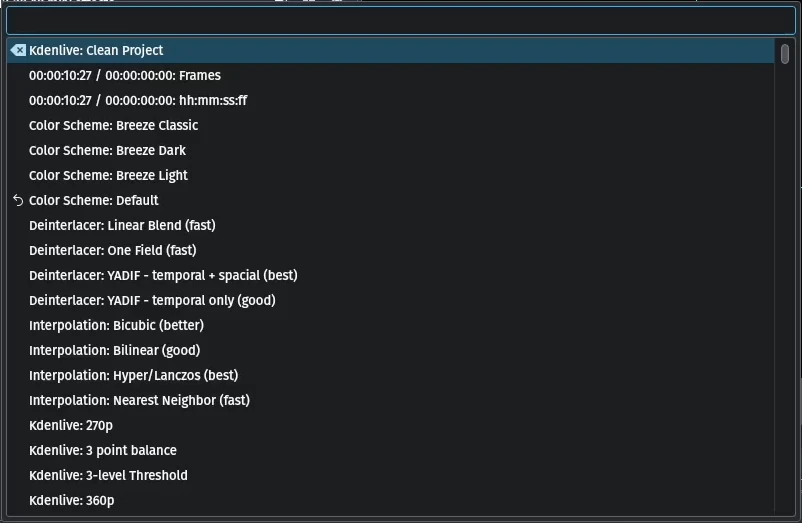
Iskanje dejanj v Kdenlive
Kopiraj podatke razhroščevanja
Ta funkcija kopira ustrezne informacije razhroščevanja v odložišče. Ko prijavite napako v Bugzilli, lahko te informacije prilepite v razdelek SOFTWARE/OS VERSIONS.
Prijavi hrošča
Ta funkcija omogoča, da napako prijavite neposredno v sledilnik hroščev Bugzilla Kdenlive s klikom na .
Darujte
Ta funkcija vam omogoča donacijo. Usmerja vas na strani donate Kdenlive, kjer se zbirajo donacije za Kdenlive (https://kdenlive.org/fund/).
O programu Kdenlive Ta funkcija vam pokaže vse podrobnosti o Kdenlive.
O KDE Kdenlive je del KDE. Pokaže vam podrobnosti o KDE.