Menu Marcatori
Le funzioni in questo menu influiscono sui marcatori che sono selezionati nella linea temporale, oppure nel contenitore del progetto. Le funzioni del menu sono disponibili a seconda che una clip sia selezionata nel contenitore del progetto o nella linea temporale.
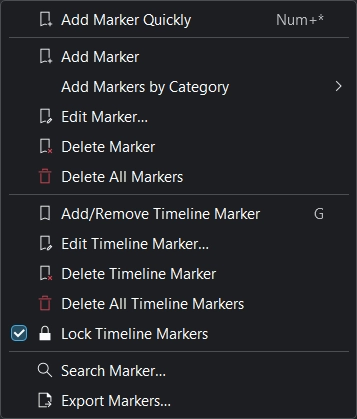
Menu Marcatori
Nota
La funzione Aggiungi marcatore si comporta in modo diverso a seconda che una clip sia selezionata nel contenitore del progetto o nella linea temporale, in base a dove si trova attualmente l’indicatore di riproduzione e a seconda che il fuoco sia sulla linea temporale oppure sul controllo della clip.
Aggiungi velocemente un marcatore
Aggiungi un nuovo marcatore nella posizione temporale attuale. Scorciatoia Num+* (nel tastierino numerico: *)
Aggiungi marcatore
Aggiunge un marcatore alla clip nel punto temporale corrente. I marcatori sono proprietà delle clip nel contenitore del progetto. Questa azione mette quindi un marcatore nella clip nel contenitore del progetto.
Nota
Affinché Aggiungi marcatore funzioni, deve essere selezionata una clip nella linea temporale. Per quella selezionata nel contenitore del progetto è possibile creare più oggetti Marcatori indipendenti dalla linea temporale.
Aggiungi marcatori per categoria
Apre un elenco per aggiungere un marcatore per categoria:
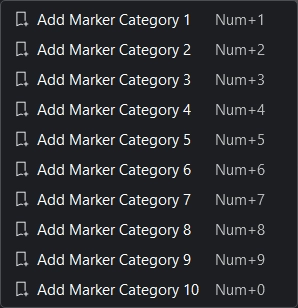
Menu Aggiungi marcatori per categoria
Modifica marcatore
Per poter funzionare l’indicatore di riproduzione deve essere esattamente sopra a un marcatore, diversamente in basso a sinistra si otterrà l’errore «Nessun marcatore trovato alla posizione del cursore». Usa i tasti Sinistra e Destra per spostare l’indicatore di riproduzione di un fotogramma alla volta, oppure insieme a Alt per spostarti al punto di modifica precedente o al successivo (ad esempio tagli, bordi della clip, marcatori e marcatori della linea temporale).
Dato che i marcatori sono delle proprietà delle clip nel contenitore del progetto, questa azione modifica il marcatore della clip sia nel contenitore del progetto che in ogni latra istanza di questa clip nella linea temporale.
Elimina marcatore
Per poter funzionare l’indicatore di riproduzione deve essere esattamente sopra a un marcatore, diversamente in basso a sinistra si otterrà l’errore «Nessun marcatore trovato alla posizione del cursore». Usa i tasti Sinistra e Destra per spostare l’indicatore di riproduzione di un fotogramma alla volta, oppure insieme a Alt per spostarti al punto di modifica precedente o al successivo (ad esempio tagli, bordi della clip, marcatori e marcatori della linea temporale).
Dato che i marcatori sono delle proprietà delle clip nel contenitore del progetto, questa azione rimuove il marcatore della clip nel contenitore del progetto e quindi in ogni altra sua istanza nella linea temporale.
Elimina tutti i marcatori
Elimina tutti i marcatori dalla clip corrente.
Dato che i marcatori sono delle proprietà delle clip nel contenitore del progetto, questa azione rimuove il marcatore della clip nel contenitore del progetto e quindi in ogni altra sua istanza nella linea temporale.
Elimina tutti i marcatori della linea temporale dalla linea temporale, senza nessun ulteriore avviso. Usa Annulla, , oppure Ctrl+Z per annullare questa azione.
Aggiungi/rimuovi marcatore della linea temporale
Aggiunge o rimuove un marcatore della linea temporale (guida) nella linea temporale alla posizione corrente dell’indicatore di riproduzione. Scorciatoia predefinita: G
Modifica marcatore della linea temporale
Apre una finestra per il marcatore della linea temporale (guida) corrente, da dove puoi modificare la sua posizione nella linea temporale, il nome e la categoria.
Elimina marcatore della linea temporale
Elimina il marcatore della linea temporale (guida) alla posizione corrente dell’indicatore di riproduzione.
Elimina tutti i marcatori della linea temporale
Elimina tutti i marcatori della linea temporale (guide).
Marcatori della linea temporale bloccati
Blocca i marcatori della linea temporale nella linea temporale, in modo che l’azione specifica non riesca a spostarli.
Cerca marcatore
Porta il fuoco nel campo di ricerca dell’oggetto dei marcatori.
Esporta marcatori
Apre una finestra nella quale puoi specificare le opzioni di esportazione dei marcatori Usa questa funzione per creare i capitoli per i caricamenti su YouTube.