工具菜单
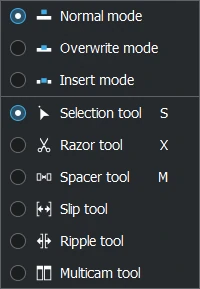
工具菜单
The options on this menu provide three modes and six tools which determine how operations are performed on clips in the timeline. The same options can also be accessed from 轨道合成 and 时间轴编辑工具. More details on their usage can be found there.
Use the navigation to the left to go to the various items.
Modes
Normal Mode
Allows clips to be added to the timeline only where there is enough space to fit them in.
Overwrite Mode
Allows clips to be added to the timeline anywhere overwriting that portion of clips already there.
Insert Mode
Allows clips to be added to the timeline anywhere cutting and shifting clips already there to accommodate the inserted clip
Tools
小技巧
ESC will always switch from any selected timeline editing tool back to the Selection Tool.
Selection Tool
Use this to select clips in the timeline. Default keyboard shortcut is S.
Razor Tool
Use this to cut clips in the timeline. Default keyboard shortcut is X.
Spacer Tool
Use this to create or remove space in the timeline between clips. Temporarily groups clips for dragging them for this purpose. Default keyboard shortcut is M.
Slip Tool
Use this to trim, in a single operation, the In and Out points of the clip maintaining its position and duration in the timeline.
Ripple Tool
Use this to trim one clip and shift the adjacent clip accordingly.
Multicam Tool
Use this to cut between several cameras/tracks while playback is running. Will switch on the multitrack view in the project monitor.